<?xml version="1.0" encoding="utf-8"?><feed xmlns="http://www.w3.org/2005/Atom" xml:lang="en_US"><generator uri="https://jekyllrb.com/" version="3.10.0">Jekyll</generator><link href="https://odravison.github.io/feed.xml" rel="self" type="application/atom+xml" /><link href="https://odravison.github.io/" rel="alternate" type="text/html" hreflang="en_US" /><updated>2026-09-22T17:57:59+00:00</updated><id>https://odravison.github.io/feed.xml</id><title type="html">dev, Odra!</title><subtitle>Blog and CV of Odravison Amaral (Odra), a backend software engineer writing about Java, Kotlin, Python, distributed systems and life in tech careers.</subtitle><author><name>Odravison Amaral</name><email>oamaraljr@gmail.com</email></author><entry><title type="html">Dangers of Names and Values in Python: The differences between Python and Java “variables”</title><link href="https://odravison.github.io/Names-And-Values" rel="alternate" type="text/html" title="Dangers of Names and Values in Python: The differences between Python and Java “variables”" /><published>2025-03-05T00:00:00+00:00</published><updated>2025-03-05T00:00:00+00:00</updated><id>https://odravison.github.io/Names-And-Values</id><content type="html" xml:base="https://odravison.github.io/Names-And-Values"><![CDATA[<p>Hi there, in this article you will read about some interested findings about how Python deals with names and values, convertionally called as variables, and why it is totally different from languages like Java, C, and others.</p>

<h3 id="index">Index</h3>

<ol>
  <li><a href="#context">Context</a></li>
  <li><a href="#variable-creation-in-java">Variable creation in Java</a></li>
  <li><a href="#variable-creation-in-python">Variable creation in Python</a></li>
  <li><a href="#the-danger-in-python">The danger in Python</a></li>
  <li><a href="#the-long-story-short">The long story, short</a></li>
</ol>

<h3 id="context">Context</h3>

<p>When working with Java and Python, it is crucial to understand the fundamental differences in how these languages handle variable creation and memory management. While both languages provide mechanisms for referencing values in memory, their approaches differ significantly due to their underlying paradigms.</p>

<h3 id="variable-creation-in-java">Variable creation in Java</h3>

<p>How a variable is created in languages like Java? By declaring its type, naming it and then assigning a value to it. This is needed because Java is a statically typed language, meaning that variable types must be explicitly declared at compile time.</p>

<p>Like this:</p>
<div class="language-java highlighter-rouge"><div class="highlight"><pre class="highlight"><code><span class="kd">class</span> <span class="nc">Main</span> <span class="o">{</span>
    <span class="kd">public</span> <span class="kd">static</span> <span class="kt">void</span> <span class="nf">main</span><span class="o">(</span><span class="nc">String</span><span class="o">[]</span> <span class="n">args</span><span class="o">)</span> <span class="o">{</span>
        <span class="kt">int</span> <span class="n">myVar</span> <span class="o">=</span> <span class="mi">10</span><span class="o">;</span> <span class="c1">// This line here is where we create a variable</span>
        <span class="nc">System</span><span class="o">.</span><span class="na">out</span><span class="o">.</span><span class="na">println</span><span class="o">(</span><span class="n">myVar</span><span class="o">);</span> <span class="c1">// prints 10</span>
    <span class="o">}</span>
<span class="o">}</span>
</code></pre></div></div>
<p>What do happen behind the scenes is that when you do <code class="language-plaintext highlighter-rouge">int myVar = 10;</code>, Java creates a space in the stack memory to store the value of <code class="language-plaintext highlighter-rouge">myVar</code>, but only because <code class="language-plaintext highlighter-rouge">int</code> is a primitive data type, otherwise, it would be stored in the <em>heap memory</em>, and the variable would only has a reference where to find the data in the <em>heap memory</em>.</p>

<p>Within a Java variable you can find its data type and its data value, the variable has its information. Which you will see that isn’t the same for Python “variables”.</p>

<h3 id="variable-creation-in-python">Variable creation in Python</h3>

<p>To understand that you should know that Python doesn’t use the term variable, instead it uses the term <em><strong>name</strong></em> that would be conventionally called a variable. So in Python we say a <em><strong>name</strong></em> refers to a <strong><em>value</em></strong> or an <em><strong>object</strong></em>, but the <em><strong>name</strong></em> doesn’t contain the <em><strong>value/object</strong></em>, like a variable do. A good analogy is saying that your name refers to you but it don’t contains you. There may even be multiple names for the same thing, just as you may have given a name and a nickname. A <em><strong>value</strong></em> is a particular instance of data in memory.</p>

<p>What happen in Python is just different, in Python there is no variable storing the data type, that’s why Python in contrast, is dynamically typed and follows a name-binding model rather than direct memory assignment. Variables in Python are merely names that reference objects in memory. You can assign a <em>name</em> firstly with a <code class="language-plaintext highlighter-rouge">float</code> value and in the very next line, use the same <em>name</em> to assign a <code class="language-plaintext highlighter-rouge">int</code> value and no error will happen. Like this:</p>
<div class="language-python highlighter-rouge"><div class="highlight"><pre class="highlight"><code><span class="n">cloth_price</span> <span class="o">=</span> <span class="mf">19.99</span> <span class="c1">## Assigning a float
</span><span class="n">cloth_price</span> <span class="o">=</span> <span class="mi">10</span> <span class="c1">## Assigning a int
</span></code></pre></div></div>
<p>The code above demonstrates how assign a <em>value</em> to a <em>name</em> in Python. That way, the name <code class="language-plaintext highlighter-rouge">cloth_price</code> is bound to the value <code class="language-plaintext highlighter-rouge">10</code> which is in the memory, meaning that the name <code class="language-plaintext highlighter-rouge">cloth_price</code> can be used to refer the value <code class="language-plaintext highlighter-rouge">10</code> in memory. This operation of binding is referred as an <em>assignment</em>.</p>

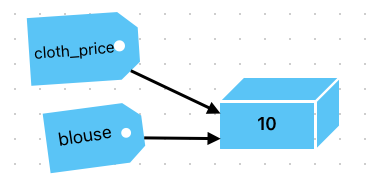
<p>If we assign other name to the name <code class="language-plaintext highlighter-rouge">cloth_price</code>, let say <code class="language-plaintext highlighter-rouge">blouse = cloth_price</code> the value 10 won’t get copied but the name <code class="language-plaintext highlighter-rouge">blouse</code> will refer to the same original value as <code class="language-plaintext highlighter-rouge">cloth_price</code> is bounded.</p>

<p>The image below can ilustrate it better:</p>

<p><img src="/assets/images/posts/python-two-names-same-value.png" alt="Diagram: the Python names cloth_price and blouse both referring to the same int object 10 in memory" /></p>

<p>What should happen if we modify the value referenced using the name <code class="language-plaintext highlighter-rouge">cloth_price</code>, will modify the value referenced by the name <code class="language-plaintext highlighter-rouge">blouse</code>? The answer is <strong>NO</strong>!</p>

<p>The reason is when a variable is assigned in Python, it does not store a value directly but instead acts as a label pointing to an object in memory, so if we do that:</p>

<div class="language-python highlighter-rouge"><div class="highlight"><pre class="highlight"><code><span class="n">cloth_price</span> <span class="o">=</span> <span class="mi">10</span>
<span class="n">blouse</span> <span class="o">=</span> <span class="n">cloth_price</span>
<span class="k">print</span><span class="p">(</span><span class="n">cloth_price</span><span class="p">)</span> <span class="c1">## prints 10
</span><span class="k">print</span><span class="p">(</span><span class="n">blouse</span><span class="p">)</span> <span class="c1">## prints 10
</span><span class="n">cloth_price</span> <span class="o">=</span> <span class="n">cloth_price</span> <span class="o">+</span> <span class="mi">3</span>
<span class="k">print</span><span class="p">(</span><span class="n">cloth_price</span><span class="p">)</span> <span class="c1">## prints 13
</span><span class="k">print</span><span class="p">(</span><span class="n">blouse</span><span class="p">)</span> <span class="c1">## prints 10
</span></code></pre></div></div>
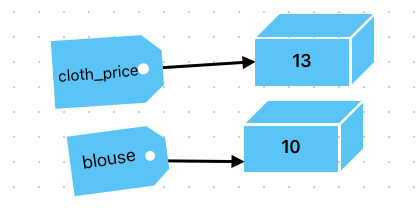
<p>It can be ilustrated as below:</p>

<p><img src="/assets/images/posts/python-two-names-different-values.png" alt="Diagram: after reassignment, cloth_price refers to a new int object 13 while blouse still refers to 10" /></p>

<p>As you can see, in the second line, <code class="language-plaintext highlighter-rouge">cloth_price</code> and <code class="language-plaintext highlighter-rouge">blouse</code> both reference the same integer object 10. After the line <code class="language-plaintext highlighter-rouge">cloth_price = 13</code> is executed, in this case since integers are immutable in Python, any modification (<code class="language-plaintext highlighter-rouge">cloth_price = cloth_price + 3</code>) results in <code class="language-plaintext highlighter-rouge">cloth_price</code> refering to a new object.</p>

<h3 id="the-danger-in-python">The Danger in Python</h3>

<p>Until here we’ve discussed about how to assign a name to a value using Python and how it differs from Java and other languages. In this particular example we used a <code class="language-plaintext highlighter-rouge">int</code> object data type which is one of many immutable data types in Python, such as <code class="language-plaintext highlighter-rouge">bool</code>, <code class="language-plaintext highlighter-rouge">float</code>, <code class="language-plaintext highlighter-rouge">tuple</code>, <code class="language-plaintext highlighter-rouge">string</code>, and <code class="language-plaintext highlighter-rouge">Unicode</code>. Those types can’t suffer mutation, therefore, every time you do some operation in one of its data, Python creates another <em>value</em> in the memory as result of your operation over the original <em>value</em>.</p>

<p>But Python has mutable data types too, they are <code class="language-plaintext highlighter-rouge">set</code> , <code class="language-plaintext highlighter-rouge">list</code> , <code class="language-plaintext highlighter-rouge">dict</code> and Data classes. When you mutate a mutable datatype, Python don’t create a new value for it, so any other name bounded with that value still get the modification. An example to ilustrate what I mean is following below:</p>

<div class="language-python highlighter-rouge"><div class="highlight"><pre class="highlight"><code><span class="c1">## Consider the function below that receives a list of integers
## and prinst the lowest number in that list
</span><span class="k">def</span> <span class="nf">find_lowest</span><span class="p">(</span><span class="n">prices</span><span class="p">):</span>
    <span class="n">prices</span><span class="p">.</span><span class="n">sort</span><span class="p">()</span>
    <span class="k">print</span><span class="p">(</span><span class="n">prices</span><span class="p">[</span><span class="mi">0</span><span class="p">])</span>


<span class="c1">## Now let use the function to find the lowest price in a list of integers
</span><span class="n">cloth_prices</span> <span class="o">=</span> <span class="p">[</span><span class="mi">10</span><span class="p">,</span> <span class="mi">13</span><span class="p">,</span> <span class="mi">2</span><span class="p">,</span> <span class="mi">4</span><span class="p">,</span> <span class="mi">5</span><span class="p">]</span>
<span class="n">find_lowest</span><span class="p">(</span><span class="n">cloth_prices</span><span class="p">)</span>
<span class="k">print</span><span class="p">(</span><span class="n">cloth_prices</span><span class="p">)</span>
</code></pre></div></div>

<p>After run this code, we’ll get the followind output:</p>
<div class="language-python highlighter-rouge"><div class="highlight"><pre class="highlight"><code><span class="mi">2</span>
<span class="p">[</span><span class="mi">2</span><span class="p">,</span> <span class="mi">4</span><span class="p">,</span> <span class="mi">5</span><span class="p">,</span> <span class="mi">10</span><span class="p">,</span> <span class="mi">13</span><span class="p">]</span>
</code></pre></div></div>

<p>At first glance, you may assume that the function would make a copy of the <code class="language-plaintext highlighter-rouge">cloth_price</code> to the function argument <code class="language-plaintext highlighter-rouge">prices</code>, but when you pass an argument to a function you’re bounding a value to a name, like any assignment operation, in that case it was like <code class="language-plaintext highlighter-rouge">prices = cloth_prices</code>, so the name <code class="language-plaintext highlighter-rouge">prices</code> is bounded to the value as <code class="language-plaintext highlighter-rouge">cloth_prices</code> is, so every mutation made in the value (the list) it will reflect in any name bounded to it.</p>

<p>To overcome this, you should make a copy of the value and then made the mutation you want.</p>

<div class="language-python highlighter-rouge"><div class="highlight"><pre class="highlight"><code><span class="k">def</span> <span class="nf">find_lowest</span><span class="p">(</span><span class="n">prices</span><span class="p">):</span>
    <span class="n">prices</span> <span class="o">=</span> <span class="nb">sorted</span><span class="p">(</span><span class="n">prices</span><span class="p">)</span>
    <span class="k">print</span><span class="p">(</span><span class="n">prices</span><span class="p">[</span><span class="mi">0</span><span class="p">])</span>
</code></pre></div></div>

<p>The builtin <code class="language-plaintext highlighter-rouge">sorted()</code> Python’s function receives a list and returns a new list, avoiding changing the original values.</p>

<h3 id="the-long-story-short">The long story, short</h3>

<p>To avoid to get you too exhausted, let wrap up what we have learned about names and values in Python, its difference with Java and why mutable values in Python should be treated carefully:</p>

<h5 id="key-differences-between-java-and-python">Key differences between Java and Python</h5>
<ol>
  <li>
    <p><strong>Typing System</strong>: Java enforces static typing, requiring explicit type declarations, whereas Python dynamically binds names to objects.</p>
  </li>
  <li>
    <p><strong>Memory Model</strong>: Java distinguishes between primitive and reference types, whereas Python treats everything as an object.</p>
  </li>
  <li>
    <p><strong>Variable Behavior</strong>: In Java, primitive values are stored directly, while objects are referenced. In Python, all variables act as references to objects in memory.</p>
  </li>
  <li>
    <p><strong>Mutability Impact</strong>: Python’s immutable types (e.g., integers, strings) cause variables to reference new objects upon modification, while Java maintains references until explicitly reassigned.</p>
  </li>
</ol>

<h5 id="dangers-of-pythons-name-value-model">Dangers of Python’s Name-Value Model:</h5>

<ol>
  <li>
    <p><strong>Immutable Types</strong>: For types like integers, strings, and tuples, any modification results in the creation of a new object, leaving previously bound names unchanged.</p>
  </li>
  <li>
    <p><strong>Mutable Types</strong>: For types like lists, dictionaries, and sets, modifications affect all names referencing the same object, which can lead to unintended side effects if not handled carefully.</p>
  </li>
</ol>

<p>I hope you liked that content, this is the result of my continous reasearch and learning path to become a senior Python developer.</p>

<hr />

<p>Sources:
<strong>Ned Batchelder - Facts and Myths about Python names and values - PyCon 2015</strong>: https://youtu.be/_AEJHKGk9ns</p>

<p>Book: McDonald, <strong>Jason C</strong>. <strong>Dead Simple Python: Idiomatic Python for the Impatient Programmer</strong> (p. 95). (Function). Kindle Edition.</p>]]></content><author><name>Odravison Amaral</name><email>oamaraljr@gmail.com</email></author><category term="python" /><category term="java" /><category term="variables" /><category term="mutability" /><summary type="html"><![CDATA[How Python binds names to values instead of storing data in variables like Java, and the hidden dangers of mutable objects shared between names.]]></summary><media:thumbnail xmlns:media="http://search.yahoo.com/mrss/" url="https://odravison.github.io/assets/images/posts/python-two-names-same-value.png" /><media:content medium="image" url="https://odravison.github.io/assets/images/posts/python-two-names-same-value.png" xmlns:media="http://search.yahoo.com/mrss/" /></entry><entry><title type="html">Why I did this blog</title><link href="https://odravison.github.io/Why-I-Did-This-Blog" rel="alternate" type="text/html" title="Why I did this blog" /><published>2025-02-11T00:00:00+00:00</published><updated>2025-02-11T00:00:00+00:00</updated><id>https://odravison.github.io/Why-I-Did-This-Blog</id><content type="html" xml:base="https://odravison.github.io/Why-I-Did-This-Blog"><![CDATA[<p>Some time ago, I was thinking about start a blog of mine so I can write some cool stuff. Firstly I thought to write about technology - it would be a techblog - but then I realized that advancing in a carrer isn’t just about technical skills - overtime, humans challenges become just as important, and in tech industry isn’t different.</p>

<p>That’s why I’ve decided to write about my daily working experiences as well, dilemmas that surround my carrer, job, teammates and technology.</p>

<p>Without futher ado, my name is Odravison Amaral (you can call me Odra), and I’m a experienced software engineer with Java and Python background. In this blog you will find valuable posts - whether technical insights to help you solve problems or reflections on the challenges of tech careers — that I hope will support your professional growth.</p>

<p>Enjoy!</p>]]></content><author><name>Odravison Amaral</name><email>oamaraljr@gmail.com</email></author><category term="career" /><category term="blogging" /><category term="software-engineering" /><summary type="html"><![CDATA[Why Odravison (Odra) Amaral, a software engineer with a Java and Python background, started a blog about technology and the human side of tech careers.]]></summary><media:thumbnail xmlns:media="http://search.yahoo.com/mrss/" url="https://odravison.github.io/assets/profile.jpg" /><media:content medium="image" url="https://odravison.github.io/assets/profile.jpg" xmlns:media="http://search.yahoo.com/mrss/" /></entry></feed>